

REST API
REST API
The system provides a REST API for automating core tasks, such as retrieving and modifying diagrams, and managing architecture elements. The API operates over the HTTP protocol with JSON serialization.
Cloud version limitations
The cloud version enforces limitations on API usage regarding request rate and size.
Authentication
Obtaining the API Key
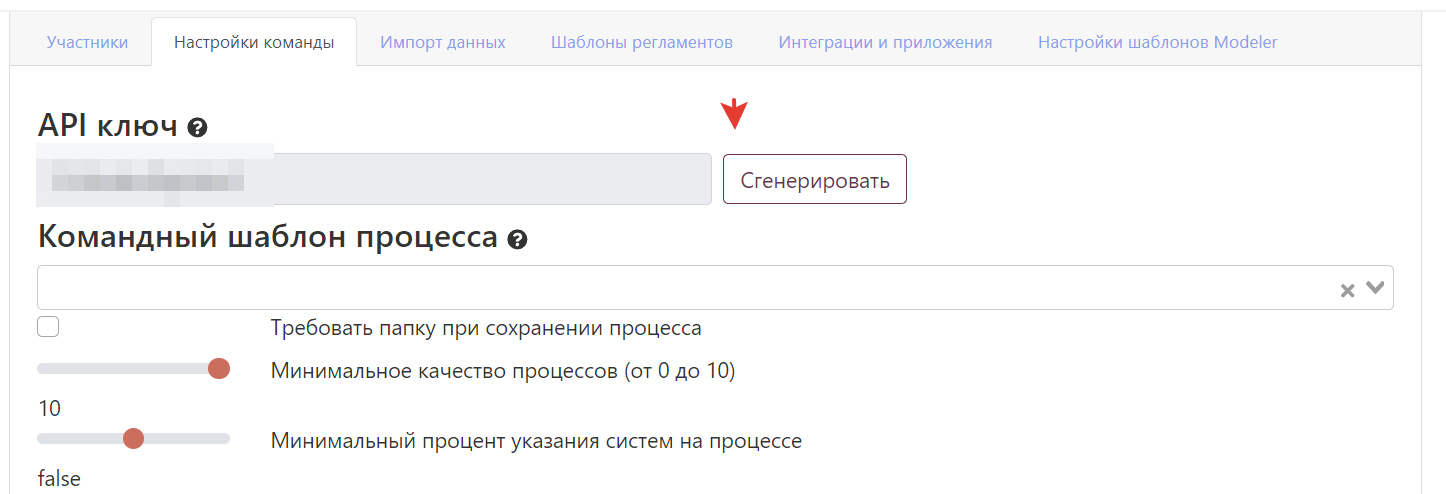
To obtain the API key, follow these steps:
- Navigate to the "Team" section
- Open the "Team Settings" tab
- Click "Generate Key"
Using the key
| Parameter | Value | Description |
|---|---|---|
| Header | X-Api-Key | Add to all API requests |
| Permissions | Team administrator | Actions are performed on behalf of the administrator |
| Security | Confidential | Do not share the key with third parties |
Cloud Version Limitations
Default Limits
| Parameter | Value | Description |
|---|---|---|
| Request rate | 5 requests/minute | Check the X-Rate-Limit-Remaining header |
| Request size | 10 MB | Maximum size of a single request |
| Diagrams per request | 20 | For diagram loading methods |
Limit Exceeded
Upon reaching the quota:
{
    "timestamp": "2022-06-28T12:03:03.438+00:00",
    "status": 429,
    "error": "Too Many Requests",
    "message": "You have exhausted your API Request Quota",
    "path": "/public-api/v1/upload-diagrams"
}
Response headers:
X-Rate-Limit-Remaining- remaining requestsX-Rate-Limit-Retry-After-Seconds- wait time until the next attempt
Account Lockout
If the limit is exceeded more than 3 times within 24 hours, the account will be locked. Contact support to unlock it.
Reference sections
- Architecture diagrams and elements — uploading diagrams, architecture elements, retrieving lists/by ID, descriptions, approvals.
- Process metrics — managing process metrics.
- Org structure — org units, positions, employees, relationships.
Changing architecture element types
Built-in architecture element types (except Document and System) are now classified as Custom types. This affects the format of API requests and data import rules.
Best Practices
Query Optimization
| Recommendation | Description |
|---|---|
| Batch processing | Send up to 20 diagrams at a time |
| Compliance with limits | Monitor rate limit headers |
| Retry logic | Implement retries with backoff |
| Logging | Store request IDs for debugging |
Security
| Aspect | Recommendation |
|---|---|
| API keys | Store them in environment variables |
| HTTPS | Use only secure connections |
| Access rights | Restrict API key permissions |
| Rotation | Regularly update keys |
Monitoring
- Track limits via response headers
- Log errors for problem analysis
- Monitor API response time
- Analyze quota usage
CI/CD Integration
Integrate the API into deployment pipelines to automatically update diagrams after code changes.
Related sections
- Configuration - system configuration
- Security - security settings
- Support - assistance with API issues